


Reporting of eData to ZPIZ


This is a service which allows the users who have received a corresponding document for the reporting of eData to electronically complete and send data.
Procedure for the reporting of eData to ZPIZ based on a received document
A link to a web service »Online viewing of documents « for sending a request towards eReporting
1. Please complete document details (ID and VK) and the e-mail address where you would like to receive an email with a document link for entering the data. All three fields are mandatory.
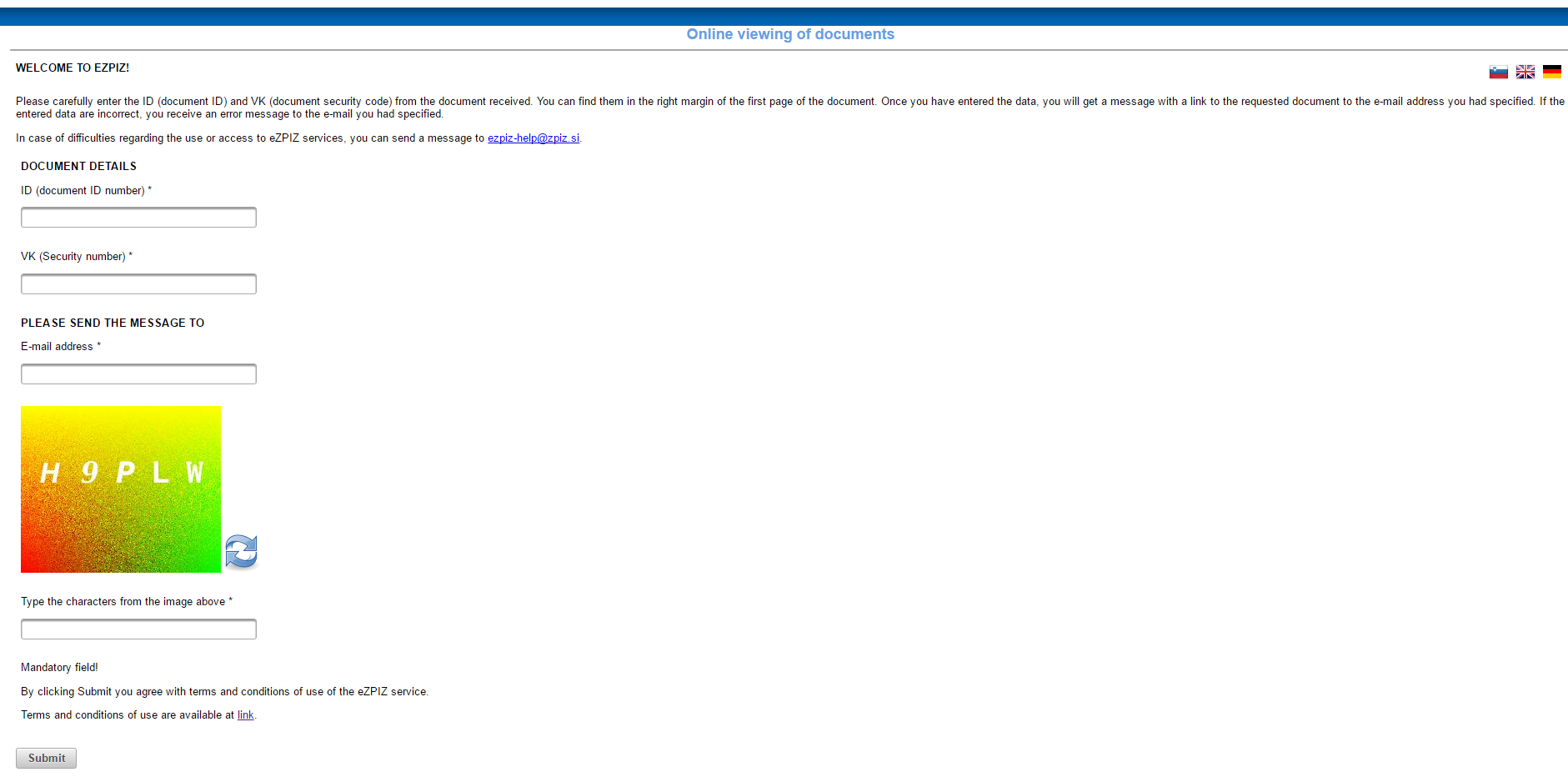
Figure 1 –An example of a website for entering ID details (ID, VK and e-mail address).
Please copy the data from the document into the section »DOCUMENT DETAILS«. (Figure2)
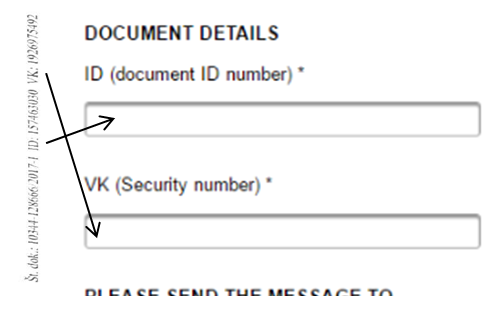
Figure 2 – A demonstration of ID and VK positioning in a document.
Once the request has successfully been sent, the following message appears: Your request has been successfully submitted.
- Once you have entered your valid e-mail address, you get a message.
a) A document identified by the entered ID and VK exists in the IT system of ZPIZ; it is possible to provide the data (Figure 3)
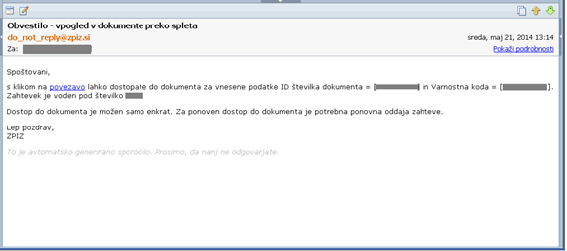
Figure 3 – An example of a received email, where a document identified by an ID and VK exists in the IT system of ZPIZ.
Please click the received link and you will be redirected to the data entering program. You can access the program with your security PIN, specified in the information you have received by mail.
Having entered your PIN and confirmed it, you can enter the data required by ZPIZ.
You can click the link only once or you will have to send a request once again. The link remains valid for 24 hours (an error message is described under Section 3).
b) A document identified by the entered ID and VK does not exist in the IT system of ZPIZ. (Figure 4)
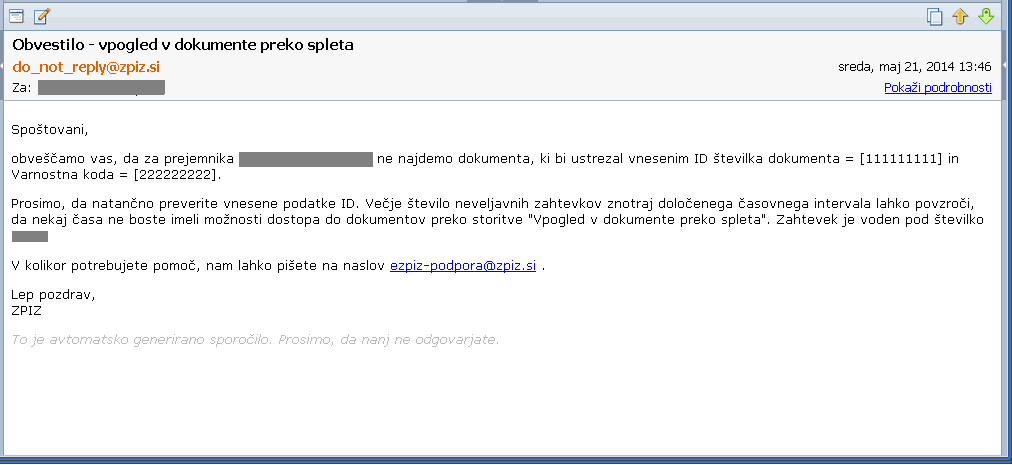
Figure 4 –An example of an email, where a document identified by the entered ID and VK does not exist in the IT system of ZPIZ.
You can click the link only once; if you try to open the link again, you get an ….. email (Figure 5).
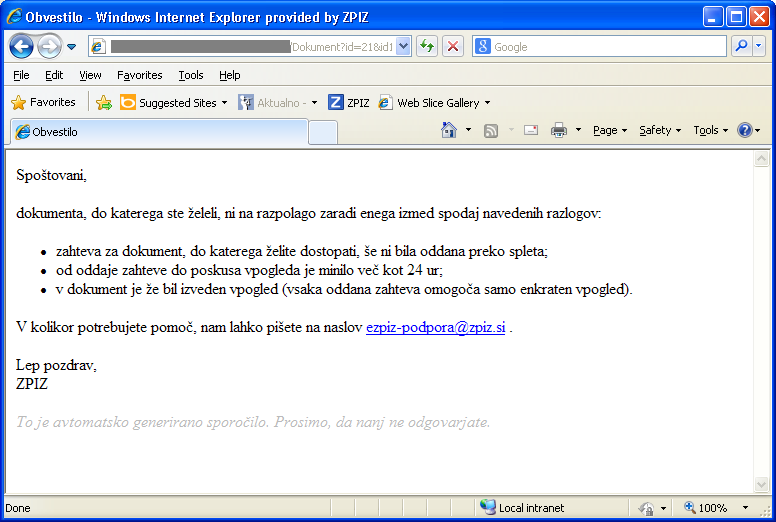
Figure 5 – An example of a message, where the session has expired or is not available
Uradne ure in kontakti
Zavod za pokojninsko in invalidsko zavarovanje Slovenije
Kolodvorska ulica 15, Ljubljana
Zavod po telefonu ves poslovni čas nudi splošne informacije o pravicah in obveznostih iz pokojninskega in invalidskega zavarovanja.
Informacije o konkretnem postopku lahko pridobite osebno v času uradnih ur.
|
Tel Fax |
01 4745 100 +386 1 432 10 46 |
| E-naslov | informacije@zpiz.si |
| Uradne ure Ponedeljek in torek Sreda Petek |
8-12 in 13-15 8-12 in 13-17 8-13 |
| Poslovni čas Ponedeljek, torek in četrtek Sreda Petek |
8-15 8-17 8-13 |
| Kontaktni center je razdeljen po področjih informacij za stranke: | Telefonske številke: |
| Informacije o bremenitvah prejemkov, ki vam jih nakazuje zavod | 01 4745 901 |
| Druge informacije o nakazilih zavoda | 01 4745 902 |
| Informacije o uveljavljanju pravic s področja pokojninskega zavarovanja | 01 4745 903 |
| Informacije o uveljavljanju pravic s področja invalidskega zavarovanja | 01 4745 904 |
| Informacije o uveljavljanju pravic s področja mednarodnega zavarovanja | 01 4745 905 |
| Informacije v zvezi s posredovanjem podatkov na obrazcih i-REK in M4 | 01 4745 906 |
| Informacije glede obvestil o neobračunanih prispevkih | 01 4745 907 |
| Informacije o obdobjih zavarovanja, osnovah in prispevkih | 01 4745 908 |
| Pomoč uporabnikom elektronskih storitev eZPIZ in BiZPIZ | 01 4745 909 |
| Elektronska storitev Informacije o stanju zadeve | 01 4745 999 |
| Elektronska storitev o zadnjih nakazilih zavoda | 01 4745 998 |
Hitre povezave
Najpogostejši uporabljeni obrazci
- Vloga za izpis obdobij zavarovanja v RS
- Zahteva za starostno ali predčasno pokojnino
- Zahteva za priznanje pravice do delne pokojnine
- Zahteva za izplačilo dela starostne / predčasne pokojnine (20%)
- Zahteva za družinsko ali vdovsko pokojnino po zavarovancu ali upokojencu
- Zahteva za dokup zavarovalne dobe
- Vloga za izdajo potrdila o nakazilih
Pomembnejše povezave
- 5. Mednarodni kongres medicinskih izvedencev Slovenije
- Ministrstvo za delo, družino, socialne zadeve in enake možnosti
- Državni portal e-uprava
- Zavod za zdravstveno zavarovanje Slovenije
- EUlisses Pokojninski vodnik
- Komisija MDDSZ - 103. čl. ZPIZ-1 in 429. čl. ZPIZ-2
- Vstop v spletno aplikacijo M-4 (Navodilo)
- Publikacije v angleščini / Publications in English
- Statistični terminološki slovar / Statistical Terminology Dictionary


Copyright 2010 ZPIZ - Zavod za pokojninsko in invalidsko zavarovanje Slovenije, Kolodvorska 15, Ljubljana
Splošni pogoji